How to save Instagram Reels: supported links and troubleshooting
You can save public Instagram Reels when FlipSave can load the video file directly.
· FlipSave運営チーム
From copying to saving
- Open the Reel you own or have permission to save and copy its link from Instagram's sharing menu. Menu names and positions depend on the app version.
- Paste the link into FlipSave and select Download. If the paste button fails, paste manually using the keyboard or touch menu. No Instagram password or login is required.
- Check the video shown and select your preferred quality to save it as an MP4 file. Available qualities vary by post, and the original video’s quality may not be available.
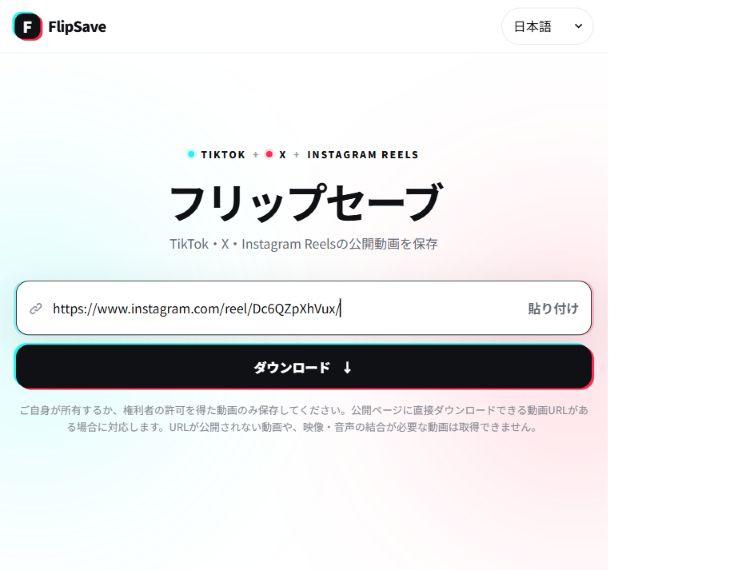
Supported scope and saved files
You can save public Instagram Reels when FlipSave can load the video file directly. Supported paths are instagram.com/reel/POST_ID/ and instagram.com/USERNAME/reel/POST_ID/. Profiles, photo posts, Stories and live streams are excluded. A public post is not a guarantee of retrieval.
If you cannot find your video, start with your browser’s downloads list. The save location depends on your device and browser settings; videos may not appear automatically in Photos or Gallery. If the video only plays, check the browser menu for a save option.
Troubleshooting by symptom
Unsupported URL
Use one Reel post link, not a profile. Separate links accidentally joined together.
Visible on Instagram, but unavailable here
A video you can watch on Instagram may still be unavailable to save if login is required or Instagram restricts downloads. You do not need to enter Instagram login details in FlipSave. If saving fails, check whether the Instagram post offers a download option.
Expired result or temporary error
Download links expire after 10 minutes. Return to the input page and submit the original post link again. For rate limits, wait as indicated on screen.
No choice of quality
The quality buttons show only the options available for that post. If there is only one, use it to save the video. Saving audio alone is not supported.
Check your saved video
After the download finishes, open the video and check the picture and sound. If it will not play, check that the download is complete and open it in an app that supports MP4. If there is no sound, check your device volume and whether the original post has audio.
Usage conditions and data
Use only videos you own or have the rights holder's permission to download. Downloads prohibited by the content provider's terms, infringement and unauthorized republication are not permitted. Saving does not grant republication or commercial rights. Video files are forwarded rather than permanently stored; operational records are retained for 90 days. FlipSave is not affiliated with Instagram or Meta.